
1
Send some audio
Send audio through the device, or feed it from another track using the SC panel.
Consequence of Time is a modulation device that uses mathematical relationships between audio and time to reshape modulation organically. Dedicated controls let you decide how contact duration influences its behavior.

Device development history, including testing milestones. These entries do not indicate public distribution.
· development milestone
· development milestone
· development milestone
· development milestone
· development milestone
· development milestone
· development milestone
· development milestone
· development milestone
· development milestone
· development milestone
· development milestone
· development milestone
· development milestone
· development milestone
· development milestone
· development milestone
· development milestone
· development milestone
Email app did not open? Request a new language

Send audio through the device, or feed it from another track using the SC panel.
C can combine A and B, add a little chaos, or bring mathematical constants into the mix.
Fine-tune the incoming signals and sculpt the modulation curves with plenty of control.
A, B and C each have a native 1+7 mapper. Go wild.
Never heard of them? They can get pretty interesting.
Live metadata unavailable. The versioned static guide remains readable.
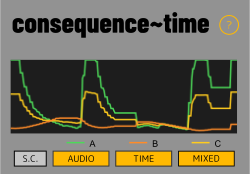
A follows audio intensity from the main input or the external sidechain. Open AUDIO to shape its envelope.
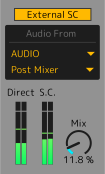
Open SC to choose an external source and channel, then set Mix between the main and external analysis inputs.
B develops with the duration of recognized contact. Open TIME for its window, growth, behaviours, hold and decay.
C combines the final A and B signals, with its own scope and mapper. The Core overlays A in green, B in orange and C in yellow.
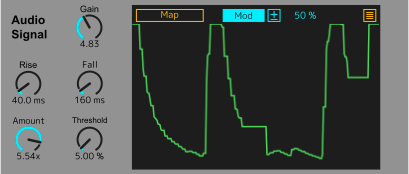
Use the main track input or select an external sidechain. Check routing when nothing moves.
Adjust incoming level before the signal is analyzed.
Set how quickly signal A reacts to increasing and decreasing audio intensity. These controls do not modify B Attack, Hold or Decay.
Adjust the amount applied to normalized A. It is not the contact threshold used by the time engine.
Audio uses the shorter labels Rise, Fall, Amount and Threshold. Amount still scales A; Threshold still qualifies Time contact. The underlying Live names and all ranges, defaults and signal behavior are unchanged.
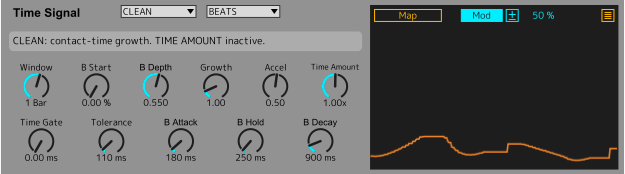
Contact begins with duration: TIME GATE sets how long the signal must stay above the AUDIO Threshold before B starts growing. Gate spans 0–2000 ms in 5 ms steps; 0 starts immediately. AUDIO Threshold sets the separate amplitude condition after Gain/Rise/Fall and before Audio Amount (default 5%; effective range 0.1–95%).
After contact is active, the release threshold is 65% of AUDIO THRESHOLD. TOLERANCE allows continuous time below that release level before HOLD then DECAY. It does not qualify initial contact.
Choose BEATS (musical tempo) or TIME (elapsed time) as the accumulation window; the two modes retain separate values.
Growth changes phase rate. Accel −10…+10, default 0.5, accelerates or slows forward growth without reversing phase. FREEZE may intentionally stop the phase.
Set initial signal level and range of movement.
Attack smooths growth, Hold keeps the value after contact is lost, Decay returns B toward zero.
Threshold 5%, Gate 50 ms, Tolerance 110 ms: 50 ms continuously above 5% qualifies contact; falling below 5% resets qualification. A keeps moving. On qualification B starts at phase zero and grows from the next nominal 5 ms tick. Once active, 110 ms below 3.25% ends contact. Gate 0 retains immediate startup; timing is not sample-accurate.
Window retains separate Beats/Time values. Native dials may display 1752.125 ms as 1.75 s without quantizing the stored value. B Start and REVERSE can produce positive B even at time phase zero.
The device includes a short on-screen message to help you understand the selected behaviour at a glance.
Pure time evolution. Time Amount has no effect in CLEAN.
Changes movement range in response to intensity.
Changes accumulation speed in response to intensity.
Adds signal-dependent irregular fluctuations.
May produce a descending positive curve, not negative output; transitions can be abrupt.
Can pause time progress when intensity meets its condition.
Quantizes the time signal into discrete steps.
Combines speed changes and irregular fluctuations. Time Amount adjusts each active behavior, not the basic B Depth.
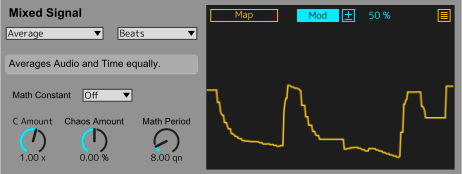
Begin with Audio Thru, C Amount +1, Chaos 0 and Math Constant Off. C equals A exactly, including tiny values. Time Thru passes B the same way.
Nine modes: Sum (soft saturation), Average, Difference (A−B), Ratio A/B, Ratio B/A, Multiply, Distance (abs(A−B)), Audio Thru and Time Thru. Ratios are protected near zero and bounded. Sum differs from Average. C Amount is −10…+10, default +1. At relevant activity of at least 1%, Amount −1 on Thru gives 1−A/B. Amount 0 gives the centre 0.5 while active; it does not unmap the target.
Non-neutral C carriers fade continuously to zero below 1% relevant final activity using t²(3−2t), t=clamp(activity/0.01,0,1). Activity is A for Audio Thru/Ratio A/B, B for Time Thru/Ratio B/A, min(A,B) for Multiply, max(A,B) otherwise. Neutral Thru bypasses attenuation. Equal active sources in Difference give 0.5; absent sources give zero. Carrier zero under Mod does not universally mean target zero.
Math Period sets the base cycle duration; Math Constant sets the ratio/phase. Constants: Off, π, e, φ, √2, ln2. Chaos Amount is −100…+100%, default 0; negative values flip deterministic motion. Chaos 0 or Constant Off removes motion exactly. Separate memories: Beats 1–64 quarter notes, default 8; Time 100–60000 ms, default 4000. A 100 ms floor is shown when applied. Visible labels preserve stored parameter identities.
Beats advances with transport Play; Time can advance with useful input while transport is stopped. B Hold/Freeze/Decay does not freeze C. Tempo feed updates every 250 ms; no sample-accurate or song-position lock is promised. Loading restarts phases; controls and the two period caches persist.
Each output has its own native 1+7 mapping interface. The overlay covers its local scope while modulation and CORE continue. Verify both destination association and mode after recall.
Mod works as relative modulation around a parameter base value. Remote takes exclusive control of its destination. These are native Ableton behaviors.
After mapping, verify actual modulation after saving and reopening the Live Set — not only that the destination name persists.
CONSEQUENCE OF TIME is in testing and is not publicly distributed. No installation package or download is offered here.
Analyze the audio passing through the track that contains Consequence of Time.
Open SC, choose the source track and channel, then use Mix to blend the main input (dry) with the external source (wet) for analysis. Check A in the Core while setting the blend.
The SC button blinks even when the panel is closed when the device is on, an external route is valid and Mix is above zero. It indicates active routing, including when the source is silent. SC opens to the left of the Core; AUDIO, TIME and MIXED open independently to the right.
Confirm that audio is present, inspect source and routing, increase Gain as appropriate, and check the contact threshold and B Depth.
Check the threshold and Tolerance, the Window, Growth, B Start/Depth and whether sufficient contact time has accumulated.
In Mod mode, the base knob may stay at its set value while modulation operates. Check the destination response, not only the knob position.
The envelope follower translates the level of the input signal into a continuous normalized modulation output.
Contact recognition drives a separate time engine. Window, Growth, Accel, Hold, Decay and Behavior change the shape of B.
C reads the final A and B outputs without feeding back into them. It has an independent trace and mapper, updated on the existing nominal 5 ms tick.
The project is a modulation effect: it is intended to let audio pass rather than synthesize new sound.